


- New
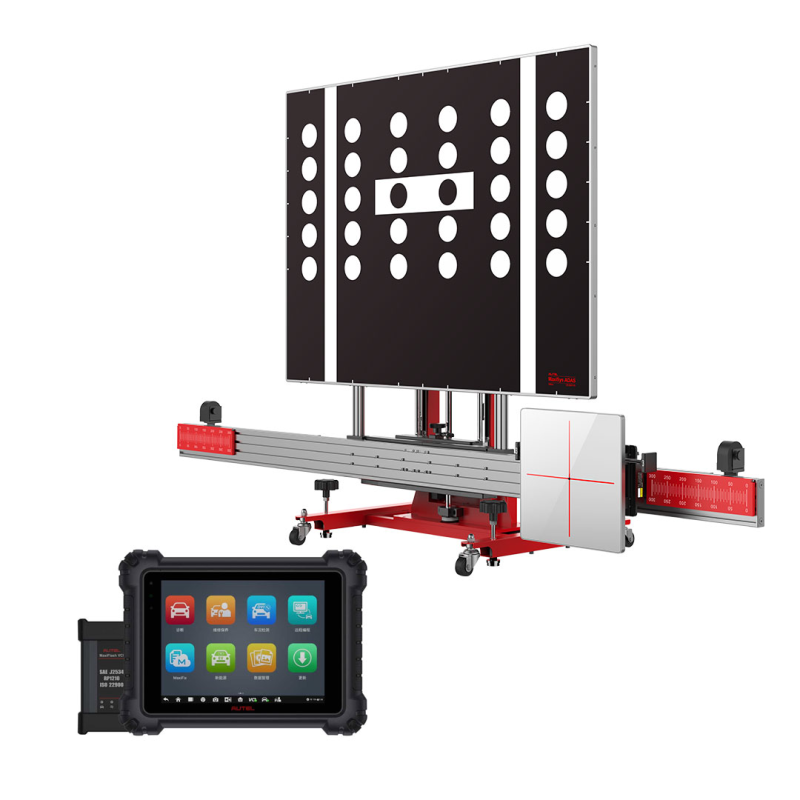



Autel MAXISYS ADAS ALL SYSTEMS 2.0T Adjustable Calibration Frame And Tools + MaxiSys MS909 Diagnostic Tablet
 Security policy(edit with the Customer Reassurance module)
 Delivery policy(edit with the Customer Reassurance module)
 Fast Delivery(edit with the Customer Reassurance module)
Diagnostic Tools From Autel
Manufacturer: Autel
The Autel calibration frame provides compatible use with vehicle leveling lifts by offering a taller than average extended adjustable height. Easily and precisely adjust calibration frame crossbar during leveling process to ensure vehicle is correctly centered and parallel while facing targets for calibration.
Autel MaxiSYS ADAS – With Maxisys MS909
Frame packages do not include software to perform ADAS Calibration. Please order MaxiSys ADAS Tablet or software upgrade separately.

Autel MaxiSYS ADAS – With Maxisys MS909
Autel MaxiSys ADAS FunctionsControl system to automatically adjust vehicle speed to maintain a safe distance from vehicles ahead. Control is based on sensor information from on-board sensors
Warns driver when vehicle begins to move out of freeway lane. Designed to minimize causes collisions: driver error, distractions and drowsiness.
Uses a thermographic camera to increase a driver’s perception and seeing distance in darkness or poor weather beyond the reach of the vehicle’s headlights.
Provides a virtual 360-degree scene of the car in bird’s-eye view. It assists drivers to park more easily by better understanding the vehicle’s surroundings.
Vehicle-based sensor function that detects other vehicles located to the driver’s side and vehicle rear, then post a proximity warning.
Braking at standstill to avoid rear-end collisions. Alert when engine started and cannot turn off. Warn driver of vehicle approach from behind by rapid signal flash.
Vehicle speedometer or navigation details projected on the windshield as transparent display so the driver does not need to look away from the road while driving.
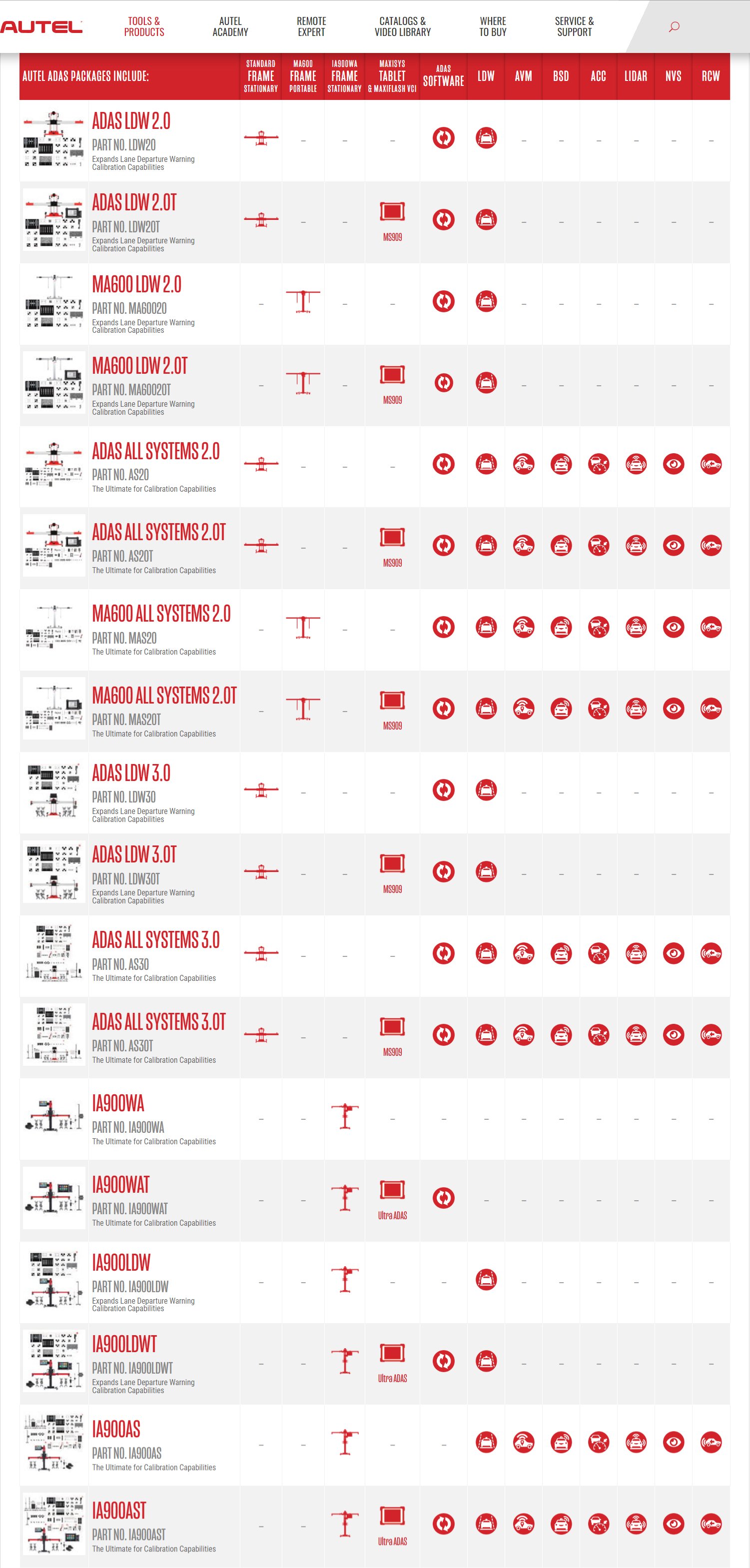
The MaxiSys ADAS provide diverse tools that are easily assembled to complete calibrations for the multi-function vehicle systems: Adaptive Cruise Control, Lane Departure Warning, Night Vision System, Blind Spot Detection, Around View Monitoring, and Rear Collision Warning.
For information of the LDW Calibration Package and the Complete Package, click the link to download the Package Comparison.
Lane Departure Warning (LDW)
Pattern Board & Target Board Holder
Paste different patterns for lane departure warning systems calibration of different vehicles.
Precise MaxiSys ADAS Calibration Software
Based on the powerful MaxiSys platform, Autel presents the MaxiSys ADAS with the original complete diagnostic functions and comprehensive ADAS calibration. Combined with the service manual, the procedures are presented with graphic instruction. The MaxiSys tablet has the best possible OE-level diagnostic coverage to offer complete ADAS and diagnostic solutions for smarter repair and calibration.
Please order the calibration frame packages separately.
The Advanced Driver Assistance System (ADAS) uses image processing cameras, radar, light detection and ranging and other sensors to monitor vehicle surroundings and detect potentially dangerous situations. Purpose: to increase safety through advanced situational awareness and reduce collision possibilities.
Sensors used in ADAS include cameras, radars, lasers and ultrasound. They can detect light, heat, pressure and other variables used to monitor the state of vehicle. Usually they locate in the front and rear bumpers, side mirrors, vehicle cab and wind shield glasses.
ADAS usually includes Traffic Message Channel (TMC), Intelligent Speed Adaptation (ISA), Vehicular Communication Systems and other driver assistant systems. The specific systems are as follows:
1) Lane Departure Warning System
2) Lane Keeping Assist
3) Traffic Sign/Signal Recognition
4) Night Vision System
5) Driver Status Monitor
6) Electric Vehicle Warning
7) Hill Descent Control
1) Parking Assist
2) Adaptive Front/Lighting System
3) Adaptive Cruise Control
4) Pedestrian Detection
5) Emergency Brake
1) Reverse Image
2) Parking Assist
3) Rear Collision Warning
1) Surround View
2) Blind Spot Detection
Under normal circumstances, after repair in an accident, calibration of the relevant auxiliary systems need to be performed. When disassembling or reinstalling monitoring components such as cameras, radars, and sensors, replacing the vehicle ECU, or the vehicle height has been changed, auxiliary and other systems need to be calibrated.
For example: ACC calibration needs to be performed in the following cases.
1. Repair or replace the Adaptive Cruise Control (ACC) radar sensor control unit
2. ACC radar sensor deviation angle out of normal range
3. Adjust position of the ACC radar sensor on the vehicle body
4. Repair or replace bumper or radiator grill
5. Adjust chassis
Perform the following steps prior to setting-up calibration toolset.
? Park the vehicle on a flat and level surface with its front wheels pointing straight and ensure there are no objects
in front of the vehicle.
? The vehicle’s coolants and engine oil should be at recommended levels and the gas tank full. The vehicle should
not be carrying any load (passengers or cargo).
? Attach the VCI to the vehicle and connect the diagnostic tool to the vehicle (if connected through cable, please
pass cable through window).
? Close the vehicle doors.
? Adjust the tire pressure to the recommended value.
? The preparation measures vary by vehicle and system. Please follow the instructions on the MaxiSys ADAS
tablet to ensure accurate calibration.
The front-view camera captures what is in front of the vehicle. It is used in a number of ADAS systems, including Lane Departure Warning (LDW), Lane Keeping Assist (LKA) and Traffic Sign/Signal Recognition (TSR) systems, often in conjunction with other sensors, cameras or sensing systems to provide input data.
The 360° or Surround View Camera System uses multiple camera views to create one 360° top-down (bird’s eye) view surrounding the vehicle. This system is used in both passive (displayed instructions) and active (autonomous) vehicle parking assist systems.
ADAS radar sensors detect fixed and moving objects at different distances around the perimeter of a vehicle. Different Radar types and frequencies are used in various ADAS systems. Ultra short-range radar (USRR) and short-range radar (SRR) provide data for blind-spot detection (BSD) and lane-change assist (LCA), while systems including adaptive cruise control (ACC) use longer range radar.
To get the valuable ADAS calibration software, you can purchase the MaxiSys ADAS tablet or purchase the ADAS calibration software upgrade for your existing MaxiSys tablet.
Cameras, sensors, ultrasound, radar and LIDAR are some of the systems used to capture the driving environment data, including travelling or static vehicles position, pedestrian location, road sign, driving lane and intersection detection, road (curves) and driving conditions (poor visibility or evening driving), use that information to instruct the vehicle to take its predetermined action. Cameras, sensors and sensing systems are typically location in front and rear bumpers, windshield, front grill and side and rear view mirrors.
ADAS calibration procedures should be performed on a level floor. If an alignment lift is used for leveling, the Autel calibration software can provide adjustment information and the calibration frame can be easily raised or lowered to be level with the vehicle.
The MaxiSys ADAS currently supports calibrations for most today’s ADAS-enabled vehicles in the USA, Asian, European markets.
1.Perform calibration procedures indoors without object obstructions
2.No exterior light sources to cast uneven surface shadows
3.Some procedures require bright background light alignments
Park the vehicle on a flat and level surface with its front wheels pointing straight and ensure there is room around the vehicle (generally there should not be objects within three meters or ten feet of the front of the vehicle).
Based on the powerful MaxiSys platform, Autel presents the MaxiSys ADAS. The MaxiSys ADAS not only provides the original complete diagnostic functionality but also offers comprehensive and precise ADAS calibration.
Combined with the best possible OE-level diagnostic coverage, the MaxiSys tablet has evolved far beyond our original tool capabilities to offer complete ADAS and diagnostic solutions for smarter repair and calibration.
A: Comprehensive Functionality
1.The MaxiSys ADAS offers all diagnostic and maintenance services of the MaxiSys tool.
2.The MaxiSys ADAS’s ADAS module covers many vehicle makes, including Benz, BMW, Audi, VW,
Porsche,Infiniti, Lexus, GM, Ford, Volvo, Toyota, Nissan, Honda, Hyundai and Kia.
3.The MaxiSys ADAS supports the calibration of multiple driver assistant systems, including Adaptive Cruise
Control (ACC), Night Vision System (NVS), Lane Departure Warning (LDW), Blind Spot Detection (BSD),
Around View Monitoring (AVM), Rear Collision Warning (RCW) and Heads-up Displays (HUD).
4.The MaxiSys ADAS supplies graphic illustrations and step-by step instructions.
5.The MaxiSys ADAS provides demos to guide the technician through the calibration.
B: Complete Tools
While the calibration procedures vary by make and the tools differ by driver assistant system, the MaxiSys ADAS calibration toolset can fulfil the flexible installation and precise calibration for a wide range of vehicle makes and systems.
1.The calibration toolset allows flexible assembly for different driver assistant systems and vehicle models.
2.The calibration frame is equipped with a sliding board for easy movement and positioning.
3.The toolset provides calibrations with millimeter accuracy via the precise marks on rulers and
the laser positioning.
Sensor Replacement / Accident Repair / Wheel Alignment / Windshield Replacement / Diagnostic Service
During the Pre-SCAN procedure, the MaxiSys software will scan all modules in all systems and list on a single screen, then provide visual ADAS icons next to the active ADAS modules. This shows technicians which ADAS systems are active and helps prepare a more detailed repair plan which includes the required ADAS calibration procedures after the repairs are complete.
The technician can review the post-calibration scan to confirm if the module DTC is cleared. The ADAS module calibration will not complete if the calibration steps were not followed correctly.
Depending on vehicle type, either a Stationary or Dynamic calibration procedure is required (in some vehicle types both are required) to calibrate ADAS sensors to vehicle modules.
• Stationary calibrations are completed in a shop environment and requires the use of targets or patterns to complete.
• Dynamic calibrations require the vehicle to be driven on roadways for a certain amount of time with well maintained road markings.
• Flat and level surface with enough room around the vehicle to complete calibration procedures. (generally, there should not be objects within the 15 foot by 30 foot calibration area)
• Perform calibration procedures indoors without object obstructions.
• No exterior light sources to cast uneven surface shadows.
• Some procedures require bright background light alignments.
• The vehicle coolants and engine oil should be at recommended levels and the gas tank full.
• The vehicle should not be carrying any load (passengers or cargo).
• Adjust the tire pressure to the recommended value.
• Attach the wireless VCI to the vehicle DLC.
• Make sure the MaxiSys is paired to the VCI, then make sure to close all the vehicle doors.
• Establish communication from the diagnostic tool to the vehicle.
• Follow the MaxiSys ADAS software instructions to ensure accurate calibration. Preparation measures vary by vehicle and system.
The Autel MaxiSys ADAS Calibration Application software provides graphic step-by-step instructions that are vehicle model specific to confirm the correct patterns are used during the correct calibration procedures. Your MaxiSys software confirms this information is correct, based on the vehicle information confirmed from the AutoSCAN feature, to confirm which active ADAS modules in any vehicle system may need a calibration procedure completed.
a. Yes, the MSADAS provides all the same diagnostic and maintence services as the MS908SP, including Pre / Post Scanning
a. You can purchase an ADAS UPGRADE to add ADAS capabilities to your existing Autel MaxiSys scan tool.
b. If you do not have an Autel scan tool, then you should purchase an MSADAS scan tool package for best value.
a. No, the MaxiSys ADAS application requires a code (QR code scan) from the calibration frame to activate the software.
For more information, see 'ADAS Frame Banding' on the DOWNLOAD page.
a. Yes, the specialty fixtures, existing targets and new vehicle coverage targets are available for individual purchase.
a. LDW, LKA, ACC (forward looking only) - You need the LDW kit (ADS-LDWPACKAGE)
b. AVM, RCW, RCA (around view / 360 view / rear looking) - You need the Complete Kit (ADS-ADASCOMPLETE)
c. Night Vision, Radar (includes Blind Spot etc.) - Also in the Complete Kit (ADS-ADASCOMPLETE)
*can be added as additional accessories to the LDW kit
a. No, the complete assembly is a simple 20-25 minute process. Graphic instruction and standard screws are included.
a. No, The MSADAS software features step by step illustrated instructions for placing the calibration frame and targets.
b. If a customer requests general ADAS training, I-CAR, CTI, and AutoTech have ADAS classes utilizing the Autel tool.
a. Insurance companies are typically paying between $200 and $300 for each ADAS calibration.
b. The ADAS application also provides the Pre and Post-SCAN features, which insurance companies pay $100-$150 for.
Specific References
No customer reviews for the moment.
Autel MAXISYS ADAS ALL SYSTEMS 2.0T Adjustable Calibration Frame And Tools + MaxiSys MS909 Diagnostic Tablet