Type 2 Socket Wallbox EV Charging Station – 7.4kW Power
Reliable daily charging – Weather-resistant design – Smart operation with OCPP support – Ideal for homes and commercial parking
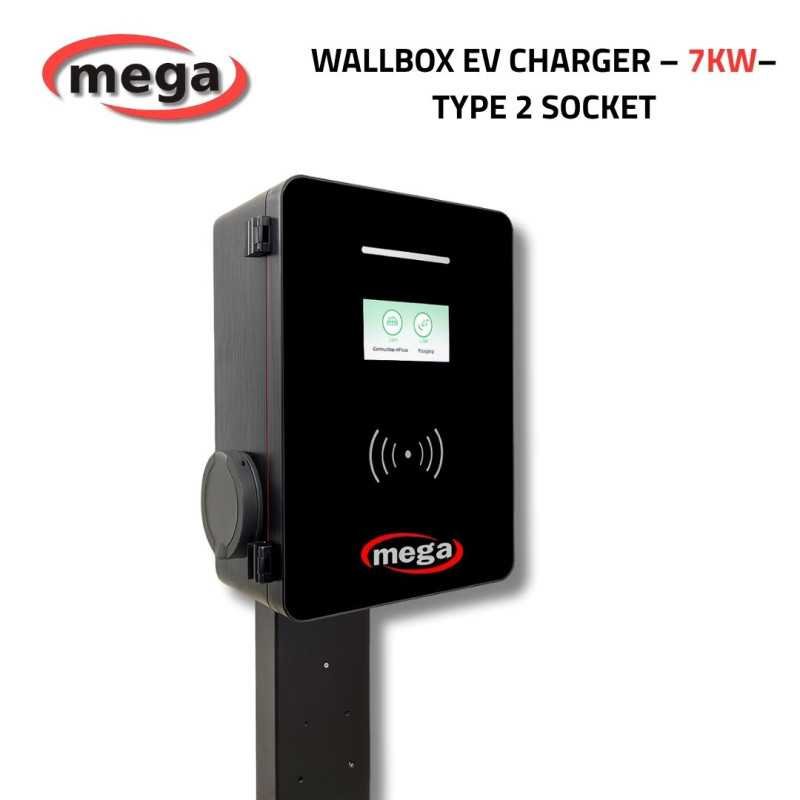
The MEGA 7.4kW charger is a smart AC charging unit designed for electric vehicles at home or low-consumption commercial locations. It features easy installation and operation, supporting multiple charging modes such as Plug & Play or smart charging via RFID card swipe or OCPP cloud control.
Equipped with an interactive display, full protection modules, and a robust IP55-rated waterproof and dustproof enclosure. It supports connectivity via Wi-Fi, Bluetooth, and RFID and includes built-in metering for accurate energy monitoring – making it ideal for outdoor or indoor use.
- Delivers up to 7.4kW of power– perfect for everyday home charging
- Full support for OCPP cloud communication and remote app control
- User-friendly interface with display, RFID reader, and metering system
- Weatherproof design – IP55-rated for dust and water resistance
- Durable body with emergency stop button and tamper-protection sensor
- Only 3W standby consumption – highly energy-efficient
- Flexible installation: wall-mounted or pedestal stand compatible
⚠️
Important Notice Before Purchase:This charger
does not include a built-in charging cable. It requires an
external Type 2 cable depending on your vehicle type. Here's a quick guide:
- European & Gulf vehicles: Require a Type 2 to Type 2 cable (e.g., BMW, VW, Audi, Tesla Gulf).
- American vehicles: Require a Type 2 to Type 1 cable (e.g., Tesla US, Ford, Chevrolet).
- Chinese vehicles: Cannot be charged directly as they use a GB/T socket. You need a Type 2 to GB/T adapter.
- Tesla US vehicles: Require a Type 2 to Tesla cable specifically for US Tesla models.
✅ The correct cable is sold separately based on your vehicle type.
📊 Technical Specifications – MEGA EV Charger 7kW
| Item | Specification |
|---|
| Power | 7 kW (AC) |
| Operating Temperature | -30°C to +55°C |
| Humidity | 5% to 95% – Non-condensing |
| Max Altitude | 2000 meters above sea level |
| Noise Level | Less than 30 dB |
| Dimensions | 26 × 38 × 15 cm |
| Input Voltage | AC220V ±15% |
| Frequency | 50Hz |
| Current | 16A |
| RCD Protection | Type A + DC 6mA |
| Protection Level | IP55 – Water & Dust Resistant |
| Cable Length | 5 meters (output cable only) |
| Charging Modes | RFID (Optional) / Plug & Charge / App / Reservation |
| Applications | Indoor and Outdoor Use |
| Load Balancing | CT + Single/Three-phase Meter |
| Smart Support | OCPP / 4G / Ethernet |
| Display | Removable (Optional) |
✅ 1. Pre-Operation Inspection:
- Ensure the installation site is accessible and suitable for maintenance.
- Verify all charger accessories are securely connected and properly fixed.
- Make sure the AC leakage circuit breaker is installed correctly.
- Confirm the charging gun is properly placed and all accessories are complete.
⚡ 2. Powering On the Device:
- Turn on the circuit breaker after completing the inspection steps.
- Check the LED indicator to identify the status:
- 🟢 Solid Green Light: Charger is on standby.
- 🔵 Solid Blue Light: Charging in progress.
- 🔴 Solid Red Light: Charger fault detected.
📡 3. Adding the Charger to the Mobile App:
- Download the Smart Life app from your app store.
- Log in or create a new account.
- Enable Wi-Fi and Bluetooth on your phone.
- Tap “Add Device” and search for the nearby charger.
- Select your Wi-Fi network (preferably 2.4GHz), enter the password, then tap “Next”.
- Wait until you see “Added Successfully”.
Note: If Wi-Fi is not available at the installation site, you can enable a hotspot from one phone and temporarily connect the charger using another phone. Alternatively, configure the charger in advance at a location with Wi-Fi, then move it to the final site.
⚙️ 4. Device Settings via Mobile App:
- Tap the lock icon at the bottom of the screen.
- Enter the password 888888 to access device settings.
- Select from 3 main configuration menus:
- 📶 Network Settings: OCPP protocol, username, TLS, APN…
- 🔧 General Settings: Code type, custom power limit, load balancing, card setup, QR code…
- 🧠 Core Functions: Charging mode, energy meter, PEN protection, operational status, and more.
Warning: You only need to reconfigure the charger in the app if:
- The Wi-Fi network or password linked to the charger is changed.
- The device is deleted from the Smart Life app.
🧭 MEGA Smart Charger Interface – Menu Overview & Control Options
1. Main Interface:
After completing the charger setup, reboot the device to access the main interface. The screen will display the status of both charging guns (A and B), along with 3 primary buttons:
- Charging Inquiry: Displays rate details per time period.
- Charging History: Shows recent sessions including amount, cost, and time.
- Card Unlock: Unlocks a registered charging card.
2. Charging Fee Inquiry:
When tapping on “Charge Query,” a screen appears showing a table with:
- Time periods
- Unit price (per kWh)
- Service fees
3. Charging Record (Record Query):
Displays all past charging sessions, including:
- Card number – Balance status.
- Mode – Network or Plug & Play.
- Charged electricity amount, cost, and stop reason.
- Start and end time for each session.
4. Unlock Charging Card:
Used to unlock a card bound to the charging point. Once the card is swiped, the lock is released, and the charger can be used again.
5. Management Configuration:
- Admin Access: From the top-right corner of the interface, enter the admin portal.
- Change Password: Tap “Password Change” to modify the admin access code.
- System Settings: Includes 4 sections:
- 📦 Basic Parameters – ID, power, load balance, time.
- 🌐 Communication Settings – Wi-Fi, OCPP, APN, TLS.
- ⚙️ Core Functions – Charging modes, protections, meter type.
- 🔐 Card Management – Add or delete cards per port.
6. Basic Function Configuration:
You can customize the charging mode between:
- Online Version
- Single Mode
- Reservation Mode
- Plug and Charge
You can also enable/disable: Ground detection, PEN protection, TLS encryption, and other technical features.
7. Card Management System:
Allows adding or deleting cards associated with the charger. Only registered cards can be used in Standalone mode.





 Security policy(edit with the Customer Reassurance module)
 Delivery policy(edit with the Customer Reassurance module)
 Fast Delivery(edit with the Customer Reassurance module)